Setup Homebrew and RVM on Mac OSX 10.11 EI Capitan
Upgraded to latest MacOSX 10.11 EI Capitan , Then you Might Know about OSX’s new System Integrity Protection ( SIP ) feature , Now you or any app can’t modify the /System or /usr or any other system files even with root permissions. If you are facing problem while installing homebrew I am going to show you how to disable SIP temporarily to install homebrew and other SIP related configuration .
Requirements {#cmdlinetools}
Install Command Line tools and Xcode ( Xcode optional not necessary )
to install Command Lines Tools open terminal and type this command
xcode-select --installand choose install.
Disable SIP {#disable_sip}
boot into Recovery mode
press Command + R
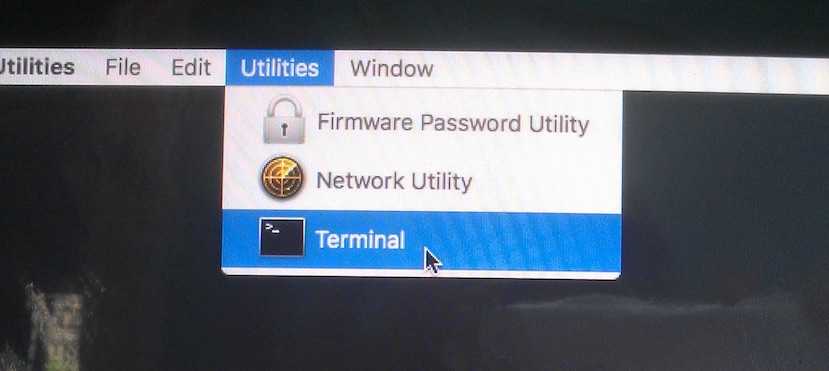
In Recovery Mode Click On ‘ Utilities > Terminal ‘
csrutil enable --without fs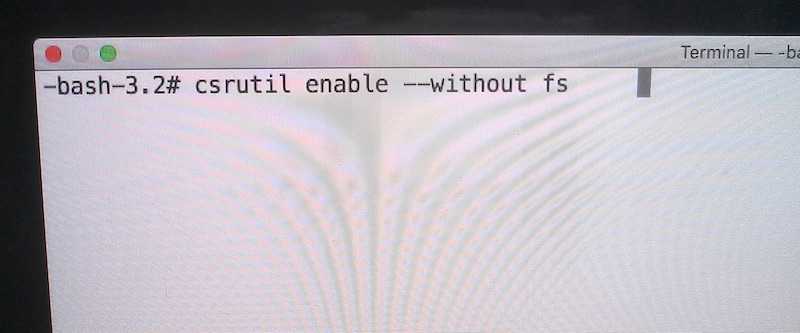
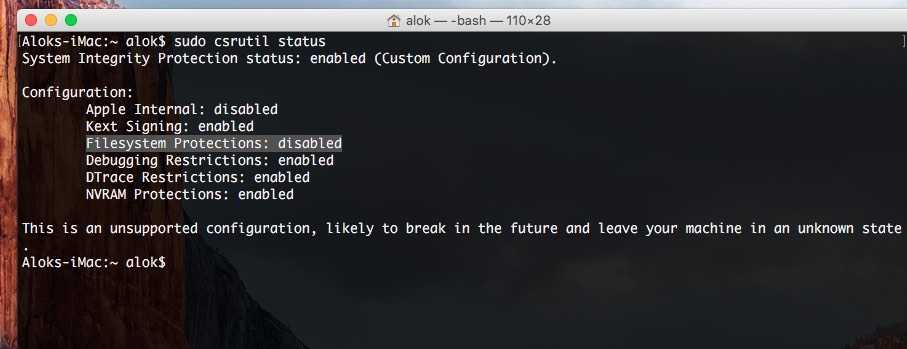
then reboot back to normal to EI Capitan then type
sudo mkdir /usr/local
sudo chown -R $(whoami):admin /usr/local
then Install Homebrew , open terminal and paste this line of code Source
ruby -e "$(curl -fsSL https://raw.githubusercontent.com/Homebrew/install/master/install)"After installation and reboot again to recovery mode this time enable all SIP , with
csrutil enableNow reboot back to normal to EI Capitan , then run brew doctor make sure everything is working correctly .
run brew
brew doctorInstalling RVM {#installrvm}
RVM is well-known tool for managing different versions of ruby and gemsets , its great tool for installing and manage ruby without sudo permission ( unless you use rvmsudo ) .
installing RVM is straight forward just copy and paste code from http://rvm.io and copy and paste code from website
\curl -sSL https://get.rvm.io | bash -s stableafter installation just restart your terminal and type type rvm | head -n 1 if it prints rvm is a function then everything is fine.
then you can install ruby easily just by typing
rvm install ruby-headthen just wait it will install the required dependencies etc .
Useful Links :
- homebrew github : http://github.com/Homebrew/homebrew/
- homebrew official instructions : https://github.com/Homebrew/homebrew/blob/master/share/doc/homebrew/Installation.md#installation
- rvm homepage : http://rvm.io